Everything you need to know
Challenge friends in fitness.
Seven quick legs, start to finish. Run the course in order, or jump straight to the leg you need.
What is OutPace?
OutPace turns your everyday movement into friendly competition. Connect the watch, app, or phone you already use, invite your friends, and let your steps and workouts sync automatically onto a live leaderboard. No manual logging, no spreadsheets. Just show up, move, and see where you stack up.
We built OutPace to make staying active feel like a game you play with the people you actually know.
Your totals update as your devices sync. No manual entry, ever.
Garmin, Apple, Google, Oura, WHOOP, and Polar connect directly, plus a bridge for almost everything else. Strava works too, with new connections paused at Strava’s athlete cap.
No credit card to join your first challenge.
How to set up a challenge
Getting a challenge going takes about a minute. Think of it as your training plan:
- 1Create a challenge. Tap Create Challenge from your dashboard.
- 2Pick what you’re competing on. Choose the metric so everyone is measured on the same scale: steps, distance, duration, activities, elevation gain, calories, sleep, or heart-rate zone points.
- 3Set the dates. Choose a start and end date. The leaderboard runs for that window and locks in a winner when it ends. There are also quick presets: a weekly challenge (Monday to Sunday) and a monthly one (the 1st to the end of the month).
- 4Name it. Give the challenge a name so your group knows what they’re joining.
- 5Invite your friends. Share the invite link by text, Messenger, WhatsApp, or anywhere else, or invite people in app if you already pace each other. They tap the link and they’re in.
- 6Connect a data source. New friends connect a device or app once and their activity starts counting automatically.
- 7Watch the leaderboard. Everyone’s totals update as their devices sync, with no manual entry. Check standings any time on the dashboard.
No device, or someone in your group would rather not connect one? Private challenges support manual entry, so nobody in your family or friends group gets left out. Just log the activity yourself. Manually entered activity shows no source in the activity feed.
Friends only need to connect their device once. It carries across every future challenge.
Recurring challenges. Set a challenge to repeat automatically so your group doesn’t have to spin up a new one every week or month.
Pacers and pacing
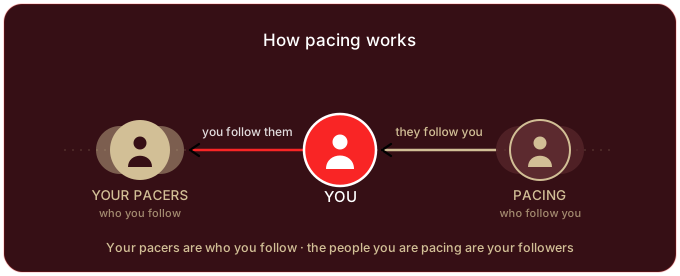
OutPace uses two words a lot, so here’s the quick version:
- My Pacers are the people you follow.
- I’m Pacing are the people who follow you. That’s the I’m Pacing tab in My Pacers: you’re their pacer.
Devices and apps we support
OutPace meets you where your data already lives. Activity gets in one of two ways: a direct connection to a platform we integrate with, or a bridge through Apple Health (iPhone) or Health Connect (Android) for everything else. We’re always working to add more devices where we can.
Direct connections
These connect in a couple of taps from Settings, then Connect Accounts. Once linked, OutPace pulls your steps and activities automatically and keeps your leaderboards current.
Link your Garmin account to sync daily step totals and activities from any Garmin watch or device.
Powered by Garmin Connect™
On iOS, OutPace reads your steps and workouts straight from Apple Health with your permission. This is also the easiest bridge for any device that writes to Apple Health.
The modern home for Android and Fitbit data. Connect once and OutPace reads your steps and activities through Google’s health platform.
Powered by Google Health
Strava support is built and working, but Strava caps new apps at a small number of connected athletes until they approve wider access. We’ve hit that cap, so new Strava connections are paused while we wait on their approval.
Powered by Strava
Link your Oura account and your ring’s workouts, daily steps, and sleep sync straight in. No bridge needed.
Powered by Oura
Connect WHOOP and your strain sessions count toward duration, calorie, and heart-rate-zone challenges automatically.
Powered by WHOOP
Link Polar Flow and your workouts, daily steps, and sleep flow in from any Polar watch.
Powered by Polar
Don’t see your device? Use the bridge.
If we don’t integrate with your device directly, there’s a strong chance it can still feed OutPace through Apple Health (iPhone) or Health Connect (Android):
- Most fitness wearables and apps, including Samsung Health, Coros, Withings, and Amazfit / Zepp, can write their data into Apple Health or Health Connect.
- Once that data is in Apple Health or Health Connect, OutPace reads it just like any direct connection.
- Amazfit / Zepp: enable Zepp to Apple Health (iPhone) or Zepp to Health Connect (Android) in the Zepp app, and your Amazfit steps and workouts will reach OutPace through that bridge.
The simple rule: if your device can sync to Apple Health or Health Connect, it can almost certainly count toward your OutPace challenges.
| Device or app | Direct connection | Bridge route |
|---|---|---|
| Garmin | Yes (Garmin Connect) | · |
| Apple Health (iPhone) | Yes | · |
| Google Health (Android) | Yes | · |
| Strava | Yes (new connections paused at Strava’s athlete cap) | · |
| Oura | Yes | · |
| WHOOP | Yes | · |
| Polar | Yes | · |
| Fitbit | Retired by Google. Use Google Health | Google Health |
| Amazfit / Zepp | · | Apple Health or Health Connect |
| Samsung Health | · | Health Connect |
| Coros, Withings, and most others | · | Apple Health or Health Connect |
Verified and working today: Garmin, Apple Health, Google Health, Oura, WHOOP, Polar. Strava is built and working but paused at Strava’s athlete cap until they approve wider access. Fitbit’s platform is being retired by Google. Google Health is its replacement, and your existing Fitbit history in OutPace is preserved.
What each source counts toward
Challenge types depend on what each platform shares with partner apps. Steps, distance, and duration work almost everywhere; the newer types vary by source. Here’s the honest picture:
| Source | Steps | Distance | Duration | Elevation | Calories | Sleep | Avg HR | HR Zones |
|---|---|---|---|---|---|---|---|---|
| Apple HealthHeart-rate metrics need a heart-rate source like Apple Watch | ✓ | ✓ | ✓ | Not available | ✓ | ✓ | ✓ | ✓ |
| GarminHeart-rate zones are recomputed from your watch’s own heart-rate series against your personal max | ✓ | ✓ | ✓ | ✓ | ✓ | ✓ | ✓ | ✓ |
| Google HealthHeart-rate zones come from Google’s own zone model, so they’re close to but not identical with a watch-measured split | ✓ | ✓ | ✓ | ✓ | ✓ | Not available | ✓ | ✓ |
| StravaBuilt and working. New connections are paused at Strava’s athlete cap until Strava approves wider access. Strava doesn’t share calories with partner apps | Not available | ✓ | ✓ | ✓ | Not available | Not available | ✓ | Not available |
| Oura | ✓ | ✓ | ✓ | Not available | ✓ | ✓ | ✓ | ✓ |
| WHOOP | Not available | Not available | ✓ | Not available | ✓ | Not available | ✓ | ✓ |
| PolarBuilt and ready. We haven’t had a Polar user connect yet. Elevation needs a barometer-equipped watch; heart-rate zones use the limits set in your Polar Flow account | Not available | Not available | Not available | Not available | Not available | Not available | Not available | Not available |
| Health Connect bridge (Android)Heart-rate access for Android bridges is still under review by Google Play | ✓ | ✓ | ✓ | Not available | Not available | Not available | Not available | Not available |
Sleep counts synced trackers only (no manual entry), at most 12 hours a night. Avg HR powers Average HR Tier Points: one tier per workout from its average heart rate, and a workout with no heart rate still counts at Tier 1. HR Zones is the finer-grained one: your minutes split across five zones, with harder minutes worth more. Some trackers hand us their own zone split rather than the raw heart-rate readings, so zone minutes can differ slightly between devices even for identical effort. We record which method each activity used.
A dash isn’t forever. We’re always working to incorporate as many data sources as possible, and we pay close attention to each platform’s API and webhook access. Where a source opens a way to bring this data into OutPace, we work to add it.
Don’t see your device anywhere? Tell us what you’re on and we’ll add it to the queue. We’re always working to add more, where it’s possible.
Frequently asked questions
Grab a cup, catch your breath. The quick answers to what everyone asks.
Is OutPace free?
Do I need a fitness watch to join a challenge?
Which devices and apps work with OutPace?
My device isn’t listed. Am I out of luck?
How does scoring work?
When are results final? What if my watch syncs late?
The standings lock once the last participant’s deadline has passed: one moment, the same for everyone, so nobody ever sees a winner announced and then watches the leaderboard change. In a challenge spanning timezones that means the further-east participants wait a little longer for the official result: their own deadline has passed, but a teammate further west can still sync. The challenge page says “final results pending” until that moment and “results are final” after it. The Weekly Relay keeps a single global clock, so the champion is crowned at 6:00 PM Monday in the relay’s home timezone.
If you know your device syncs slowly, opening OutPace is usually enough to push it through.
Does my Weekly Relay team carry over to next week?
What’s a “pacer”?
Does OutPace track my location?
Will you ever sell my data?
Who can see my Strava activities?
Why don’t my WHOOP workouts count on leaderboards?
How do I invite friends to a challenge?
What if the notifications get noisy?
I use Fitbit. What happened to the Fitbit connection?
Do all trackers count toward every challenge type?
Can I keep an eye on a challenge without opening the app?
Can I disconnect a device or delete my data?
Your data stays yours
We only ever use your activity data to power your challenges, and we take protecting it seriously.
- We don’t track your location. OutPace reads the numbers that decide a leaderboard, like your steps, distance, active minutes, and activity type. We don’t store your GPS routes or coordinates, we don’t map where you’ve been, and we don’t track where you are.
- We will never sell your data. Not now, not ever. Not to advertisers, not to data brokers, not to anyone. Your information is not our product. It is only ever used to show where you stand in the challenges you join.
- You stay in control. Connect a source in a couple of taps and disconnect it just as fast. You can delete your account and your data whenever you want, and there’s a public data deletion page for exactly that.
- Free to start. No credit card to join your first challenge.
Your movement should count toward a little friendly competition with the people you know. That is the only thing we use it for.
Staying in the loop
A challenge is more fun when you can feel it moving. OutPace sends a small set of notifications to keep the friendly competition alive. A nudge from a friend, a high five on a good day, or a heads up when the leaderboard shifts under you. We work to keep them meaningful instead of noisy, and every one of them is yours to turn on or off.
What we send
- Nudges and high fives. When a pacer cheers you on or pokes you to get moving.
- Weekly recap. A Sunday heads up that your week is ready to share, with your miles, your best day, and how you stacked up against last week.
- Leaderboard movement. The big moments only. When you take the lead, lose it, or move in or out of a challenge’s top 3. At most once per challenge per day, never a ping for every tiny change.
- Got outpaced. A heads up when a friend passes you on a challenge leaderboard, so you know it’s time to reclaim your spot.
- Weekly Relay. A Sunday wrap-up of the community relay, plus a nudge when your team hits its goal.
- Challenge invites and updates. When someone invites you, or accepts the challenge you sent.
Our thinking
Accountability is the whole point, and a nudge at the right moment is what gets you out the door. But a noisy app is one you mute and forget. So we cap the loud ones, only fire on moments that actually matter, and leave the quieter channels off by default. If a notification is not earning its place, it should not be there.
You stay in control
Turn any type on or off. In Settings, then Notifications, you can flip each kind on its own: nudges, high fives, weekly recap, leaderboard movement, got outpaced, and the Weekly Relay.
Push is separate. Keep the alerts inside the app and turn phone push off, or the reverse.
Mute a single challenge. Open any challenge and mute just that one, without touching the rest.
Fine tune by pacer. In My Pacers you choose whose activity you hear about.
Movement that pays off
Leaderboards are only half the fun. OutPace rewards showing up, week after week, with things you can actually collect and show off on your profile.
🌍 The Weekly Relay
Every week, all of OutPace runs one giant cooperative challenge. Form a small team with friends, or join one, and work toward a single shared goal together before Sunday night. Hit it as a team and every member finishes the Relay. The top team of the week takes the Champion crown. Miss a week? Next Monday is a fresh start. Some Relays count a single activity, others combine a few like running and walking. Walking always includes your hikes.
🏅 Badges
Badges are collectible achievements that live on your profile, right below your Trophy Case. Earn them for firsts like your first synced activity, your first finished challenge, and your first Relay, for winning the Weekly Relay, and for rare moments like being one of the first 500 people on OutPace. Some are common. Some almost nobody has. Tap any badge to see how rare it really is.
🔥 Streaks
Stay active and the flame follows you everywhere: your profile, the pacer feed, and every leaderboard you appear on. An active day is 30 minutes of synced activity or 10,000 steps. Keep it going five days and your flame appears with your count. Wearable synced late? No problem, a few days of grace means slow syncing never breaks an honest streak.
- Two flames. A daily flame for consecutive active days, and a separate Relay flame for consecutive completed Relay weeks.
- Milestone badges. Cross 7, 30, 100, or 365 days and the badge is yours forever, even if the streak later ends.
Show up, move, and the medals take care of themselves.
The story behind OutPace
Where it started.
OutPace didn’t come from a whiteboard. It came from a group chat. Three of us in the same military unit got to trash talking about who could run the most miles over a few months. The other two already had a running group going where they challenged each other. I got cocky and challenged them both at once. They liked it so much they pulled in five more, so it became seven against one. I lost. It wasn’t close.
But nobody wanted to stop.
So we ran it again. And again. A few rounds in, we were fifty people across different units, different watches, and different apps, all screenshotting our totals into a WhatsApp chat and tracking it in a shared Google Doc. We called it the JBMDL and Friends Workout Challenge, JFWC for short (JBMDL is Joint Base McGuire-Dix-Lakehurst), and we’re on our sixth round now. That messy Google Doc is the reason OutPace exists. It’s the app that should have been there the whole time.
Why it’s built the way it is.
I wanted one rule to hold: your movement should count automatically, no matter what you wear. That’s why so much of the work has gone into connecting Garmin, Apple Health, Google Health, Oura, WHOOP, Polar, and Android wearables like Amazfit, so nobody sits out a challenge because of the brand on their wrist.
The rest of it comes from the part of running I actually care about. The miles I remember aren’t my fastest ones. They’re the ones where I was a few steps off somebody’s shoulder at mile 22, talking them through the part where it stops being fun. Getting somebody to a finish line they weren’t sure they’d reach is the best thing I know how to do, and it’s never once required them to be fast. So OutPace stays friendly, not cutthroat. The leaderboard is there to give you a reason to text your friend, not to rank you against a stranger. You don’t have to be an athlete to belong on it. You have to show up, and the person in last place gets the same nudges and high fives as the person in first.
And your data stays yours.
I’ll say this as plainly as I can, because it’s the part I’d want to know: we will never sell your data. Not now, not ever. Not to advertisers, not to data brokers, not to anyone. Your information is not our product. We read the numbers that decide a leaderboard (steps, distance, active minutes, activity type, and the heart-rate and sleep figures behind those challenge types), and we use them to show where you stand in the challenges you joined. Nothing else. We don’t store your GPS routes, we don’t map where you’ve been, and we don’t track where you are. You can disconnect any source or delete your account whenever you want, and it’s free to start.
Who’s behind it.
I’m a solo founder, an ultramarathoner, and an Air Force Reservist. The whole thing grew out of a military group chat, and the Air Force is a big part of my life. Over the years I’ve run with seven different friends across all kinds of races and distances, from half marathons and full marathons to 50Ks, 24 hour races, and 100 milers, and somewhere in there I realized I have a real passion for running alongside other people and pushing them toward a goal they thought might be too far out of reach.
A few of the ones I’ll never forget: lining up for four friends’ first 50K at the USMC 50K in 2024, pacing a buddy through his first marathon in Columbus, running my brother in law’s first and second marathons with him (USMC 2025 and USCG 2026), a good friend’s first half marathon in Jersey City in 2025, and one friend who went from his first 50 miler and first 100K at the Hainesport 24 hour in 2025 all the way to his first 100 miler at Blackbeard’s 100 in 2026.
📸 Photos and videos from along the way are coming soon.
The people who made it real.
OutPace looks the way it does because of Amanda. The design is all hers. Every screen, every color, the whole feel of the app came from her, and it’s the reason OutPace is something you actually want to open instead of just another tracker. I can’t thank her enough.
And to the close friends and family who tested the early builds: thank you. You ran the challenges before they were ready, lived with the rough edges, and told me the truth about what was and wasn’t working. You shaped this into something real, and OutPace is as much yours as it is mine.
Where we’re headed.
I want to build a community of people having fun, challenging themselves and each other to run, swim, bike, and train harder and longer. A community where it doesn’t matter what device you’re wearing. We can still line up against each other, and hopefully find each other in the gym, in the pool, or out on the road.
Ready to OutPace your friends?
🏁 You’ve reached the finish line